
Beholder
Windows & MacOS Application . March 2026

See everything, Build faster.
For years, I kept running into the same problem. A huge portion of the work I make begins in Maxon’s Cinema 4D. Fully three-dimensional. Fully dependent on a pipeline that asks too many questions every time a deadline gets close. Which render engine should I use? How do I get this asset production-ready fast enough? How much technical setup stands between the idea and the image?
I wanted to build something better. Not just a library. A Swiss Army knife for 3D asset management. A system that could ingest assets on macOS or Windows and push them directly into Cinema 4D with the right logic already in place. Metals arrive with the correct Index of Refraction. Plastics carry the right subsurface scattering. Plants come in with vertex maps ready to move in the wind. No rebuilding. No repetitive setup. No digging through layers of menus to make basic changes.
Then I wanted to go further. Every asset should come with its own custom interface, so the controls live exactly where you need them: on the material itself. Color, behavior, parameters, all surfaced clearly and immediately. Less hunting. More shaping. Then the bigger question became obvious: what if this could work not just for a handful of assets, but for thousands? That’s Beholder.
Beholder is an asset management system built to turn 3D chaos into usable momentum. It ingests files, translates them into multiple quality states, and connects to a Cinema 4D plugin that listens for the app in real time. When an asset is called in, it arrives with the right parameters, the right values, and the right level of readiness already built in. The goal was simple: remove friction between creation and completion. Beholder does that by making complex assets feel immediate.
You bought the textures. You downloaded the libraries. Now you spend more time managing files than making images. Beholder is the missing layer between your hard drives and your render engine, it’s a single interface that turns raw assets into production-ready Redshift materials in one click.
Library
Every texture you own in one place.
Point Beholder at any custom libraries on your hard drive. It scans, classifies, and indexes everything from surfaces, 3D models, HDRIs, plants, atlases, and decals into a browsable grid with resolution-aware thumbnails, favorites, custom groups, and global search.
Detach any library into its own floating window. Tag assets with material presets. Drag to reorder. Collapse into groups. The sidebar is yours.
01: Smart Classification
Eight-priority detection system automatically identifies surfaces, 3D models, HDRIs, plants, atlases, animations, and video assets. Vendor-specific naming conventions decoded on the fly.
02: Tagging & Overrides
Create custom tags like "Glass" or "Metal" with Redshift material property overrides. Assign to individual assets or entire folders—tags inherit down the hierarchy and merge by priority.
03: HDRI Tone-Mapping
EXR and HDR files are tone-mapped into browsable thumbnails with automatic exposure boosting for dark displacement maps. Cached to disk. Generated with ease and speed as you scroll.
04: Image Sequence, MP4, Quicktime, Vector, and GIF support
The library supports many types of files formats and previews each of them appropriately. It even handles large EXR animated sequences and image sequences that can copied and directly used for animated gobos or various 3D needs.
Asset Standardization
Processing Pipelines
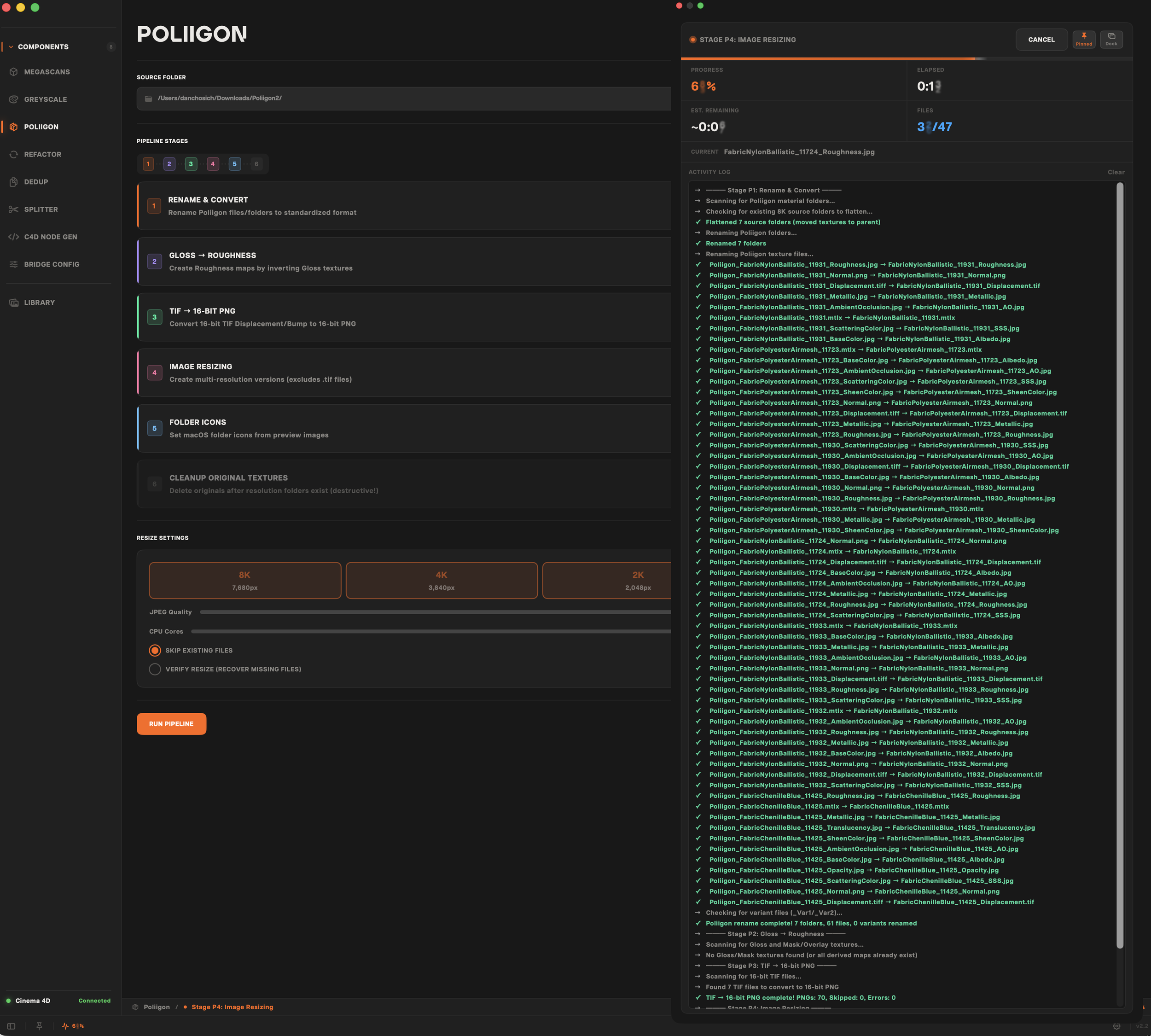
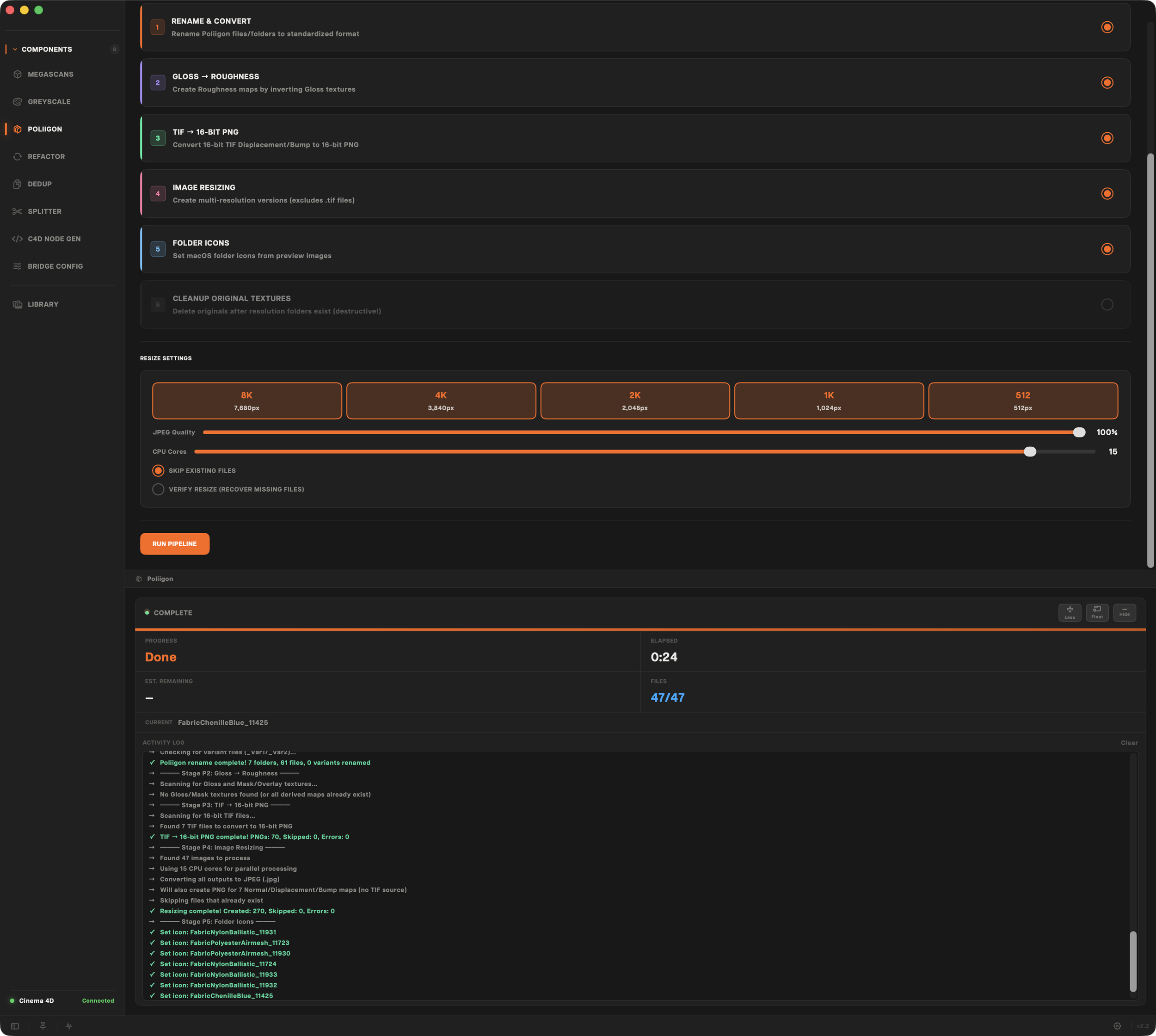
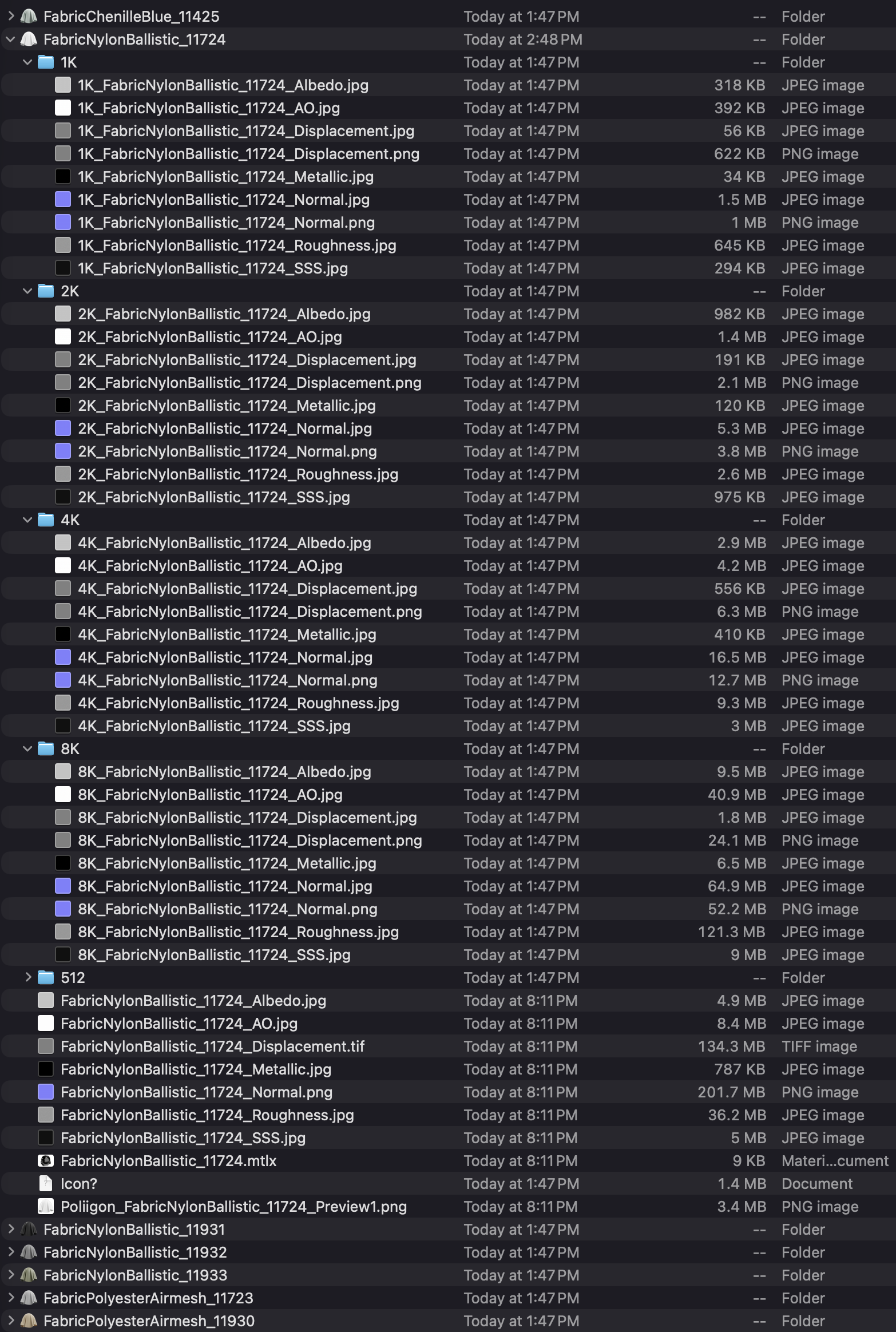
Vendor libraries ship in vendor formats. Different naming conventions, different folder structures, different resolution strategies. Beholder's processing pipelines normalize everything into a unified, resolution-stratified structure that are deduplicated, renamed, resized, and ready to browse.
01: Resize & Convert
Cascade resizing creates 512, 1K, 2K, 4K, and 8K variants. EXR displacement maps convert to 16-bit PNGs. Configurable JPEG quality and core count.
02: Rename & Normalize
JSON metadata, texture prefixes, and cross-referencing rebuild folder and file names into a clean, consistent structure.
03: Finalize
Windows and macOS folder icons assigned from preview images. Original oversized textures optionally cleaned up. Verification pass recovers missing files
Cinema 4D Bridge
Beholder doesn't hand Cinema 4D a list of textures and wish it luck. It builds the entire Redshift Standard Material node graph with every texture routed to the correct port, every color space set, every connection wired through a direct file-based protocol to the Beholder Bridge plugin.
Bridge Config
Bridge Config creates custom User Data fields on every imported material with sliders, drop-downs, color pickers, toggles, and text fields that control Redshift node ports in real time. Adjust Roughness Blend, TriPlanar scale, random UV offset, or imperfection intensity without opening the node graph. The plugin polls every 500ms and applies changes instantly.
Live Switching
Switch texture resolution from 512 to 8K without reimporting. Swap LOD geometry while preserving transforms and materials. Cycle through plant variants; each with their own FBX, their own LODs, their own textures. All through User Data drop-downs right in the Cinema 4D Attribute Manager.
Node Graph: Complete Redshift Wiring
Albedo through Color Correct and AO Multiply Color Layer. Normal through Bump Map with tangent-space encoding. Roughness, Metalness, Opacity, SSS, Translucency, Emission, Fuzz, Cavity, Displacement—every map routed to its exact port. Bump Blender nodes when both Normal and Height exist. Displacement Blender for dual displacement. This is not a shortcut. This is the full graph.
Keep it Natural
When a plant FBX arrives with vertex color data, Beholder's plugin reads the R and G channels, inverts them into vertex maps, creates a Jiggle deformer with the correct stiffness and drag assignments, parents a Wind force object underneath, and sets every parameter in one import. A 16-step manual process, done in an instant.
Tech Overview
Beholder is built in Swift and SwiftUI on macOS, with a Windows 11 port targeting XAML and WinUI. No web wrappers. No cross-platform frameworks pretending to be native. The Cinema 4D plugin is pure Python 3.11 running inside C4D's embedded CPython interpreter.
macOS
Swift 5.9 and SwiftUI on macOS 14 Sonoma. Observable state management—no Combine, no third-party dependencies. CoreGraphics and Accelerate (vImage) for image processing. Metal-backed thumbnail rasterization. Detachable NSPanel floating windows with frosted glass materials.
Windows 11
Full native port using XAML and WinUI. Not a wrapper, not a translation layer instead it’s a ground-up reimplementation of the UI targeting Windows conventions while preserving the same file-based bridge protocol and Python plugin architecture. This Windows program was built for speed and reliability not for ease of porting between platforms.
C4D Bridge Protocol
File-based JSON command queue. No sockets, no network, no shared memory. Beholder writes a JSON command. The plugin polls, processes, responds. Heartbeat file confirms connection. Seven commands cover the full material lifecycle: create, import, switch resolution, switch LOD, switch variant, update config, and ping.